The Plasma Software Stack: What You Actually Need
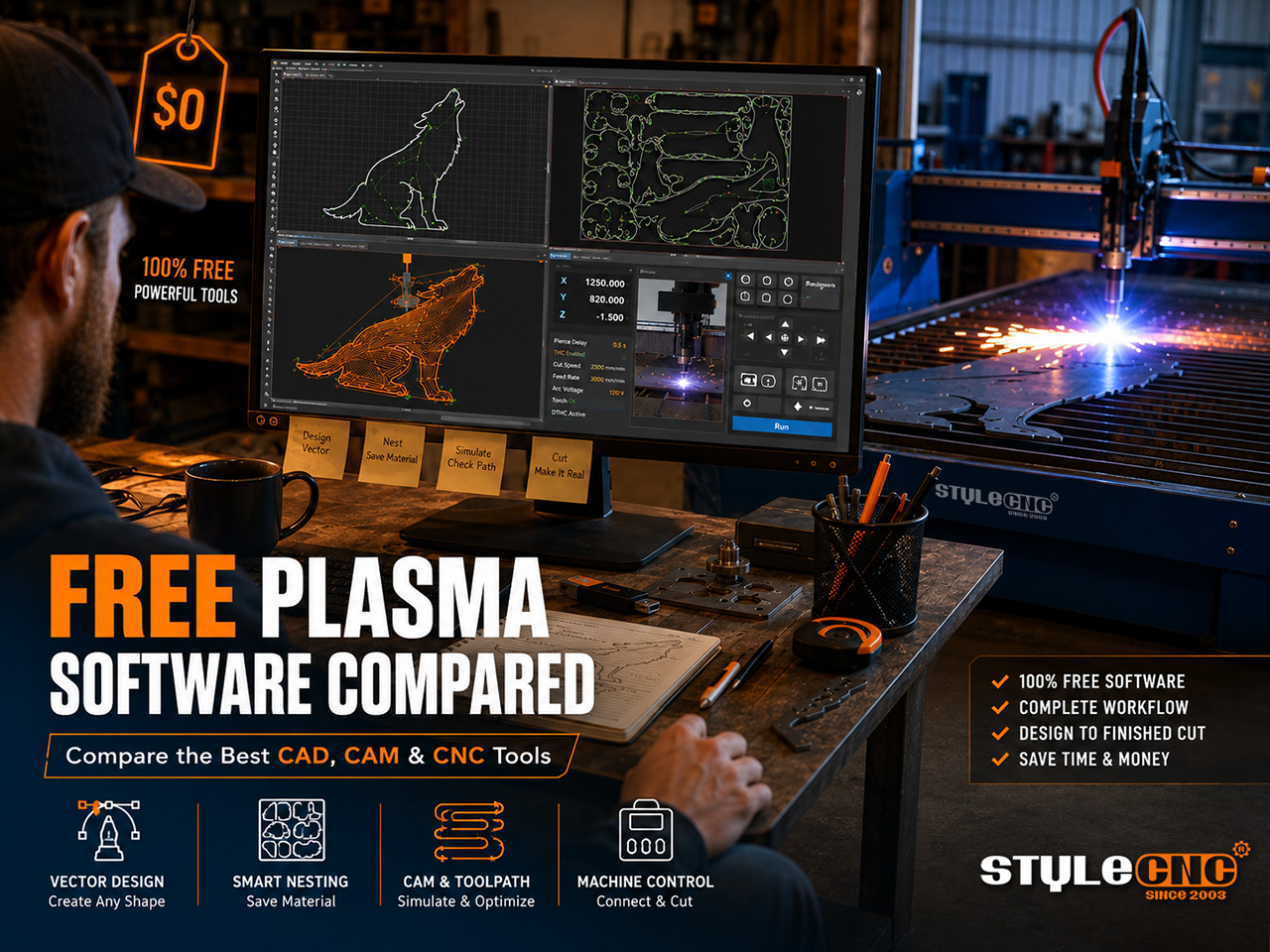
A complete free plasma cutting software stack combines Inkscape or QCAD for design (CAD), Fusion 360 free hobbyist license or Kiri:Moto for toolpaths (CAM), Deepnest or SVGnest for sheet nesting, and LinuxCNC with PlasmaC or your table's bundled controller software for machine control. Total cost: zero, with real but manageable limitations at each layer.
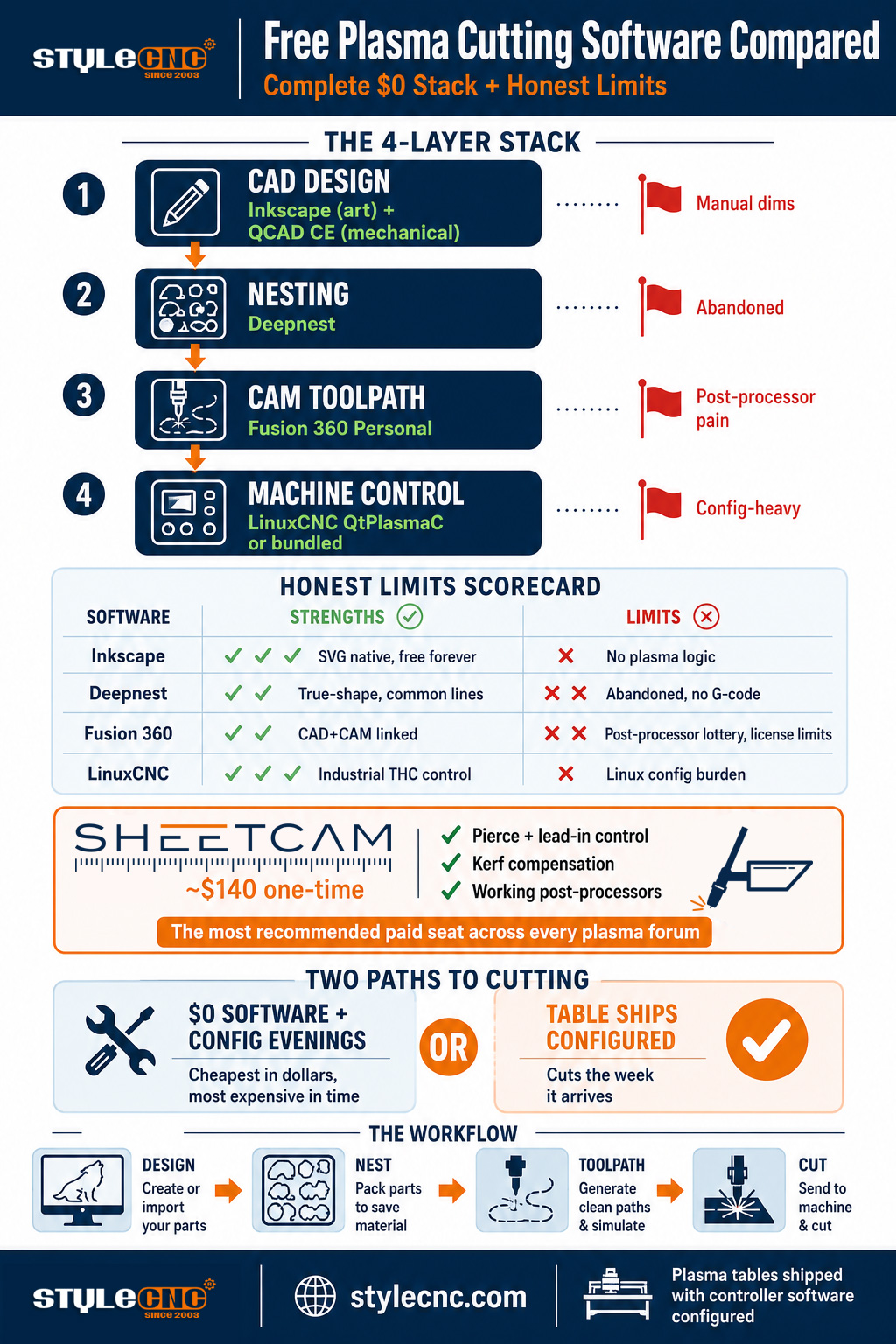
Plasma software splits into 4 layers, and understanding the split prevents the most common beginner mistake: expecting one free program to do everything.
✓ CAD (design): Where you draw or import the shapes to cut. Output is a vector file, usually SVG or DXF.
✓ CAM (toolpath): Where vector shapes become cutting instructions: lead-ins, kerf compensation, pierce points, cut order. Output is G-code.
✓ Nesting: Where multiple parts get packed onto one sheet to minimize scrap. Sits between CAD and CAM.
✓ Control de maquina: The software that reads G-code and drives the table. Usually tied to your controller hardware.
Free options exist at every layer. The catch is that the free tools were mostly built for other machines (laser cutters, routers, 3D printers) or abandoned years ago, so plasma-specific features like torch h8 control integration, pierce delay handling, and kerf-aware lead-ins need workarounds or care.
Free CAD for Plasma: Design Layer
FREE CAD: Inkscape | Free forever, open source
Ventajas: The community standard for plasma art design. Native SVG output imports directly into SheetCAM and Deepnest with arcs and curves intact. Excellent text handling, boolean operations, path offsets, and image tracing for converting photos to cut files. Runs on Windows, Mac, and Linux. PlasmaSpider forum members consistently recommend it as the artistic-work default.
Límites honestos: Not built for precision mechanical parts. Dimensioning is manual, there are no parametric constraints, and PlasmaSpider users note it has no native plasma pierce or kerf logic, so everything cut-related happens downstream in CAM. Drawing accurate brackets means typing X-Y coordinates by hand.
Veredicto: The right free choice for signs, art, silhouettes, and decorative work. Pair it with QCAD when you need dimensioned mechanical parts.
FREE CAD: QCAD Community Edition | Free (Pro version ~$40)
Ventajas: Real 2D CAD with lines, arcs, dimensions, layers, and snapping, much closer to AutoCAD workflow than Inkscape. The free Community Edition handles most bracket and flange drawing tasks. LinuxCNC forum users pair it with SheetCAM as a standard combination.
Límites honestos: Free edition exports DXF only; SVG export requires the paid Pro version. Some DXF files transfer imperfectly into CAM programs, with PlasmaSpider users reporting entities that arrive corrupted and need cleanup. No 3D, which matters only if you also design for other processes.
Veredicto: The right free choice for mechanical parts, brackets, and anything needing real dimensions. The $40 Pro upgrade is the cheapest genuinely useful paid step in the whole stack.
FREE CAD: Solid Edge Community Edition | Free for non-commercial use
Ventajas: Full parametric 3D CAD from Siemens at zero cost. LinuxCNC forum users recommend it for serious mechanical design, exporting DXF flat patterns into SheetCAM or Fusion 360 for CAM.
Límites honestos: Files from the free edition cannot be opened by commercial Solid Edge seats, which walls off collaboration with businesses. Steeper learning curve than any 2D tool. Non-commercial license restricts use once your table starts earning money.
Veredicto: Best free option for complex 3D-derived flat parts. Watch the non-commercial clause if your hobby becomes a business.
Free CAM for Plasma: Toolpath Layer
FREE CAM: Fusion 360 (Personal License) | Free for hobbyists earning under $1,000/year
Ventajas: Integrated CAD plus CAM in one package, with 2D profile toolpaths that work for plasma. Toolpaths stay linked to geometry, so design edits update cuts automatically. Massive tutorial ecosystem. Langmuir table owners widely use it for both design and G-code generation.
Límites honestos: Plasma is not a first-class citizen. PlasmaSpider users bluntly note that plasma post-processors are hit-or-miss outside big-name industrial controls, and finding or editing a working post for a generic Chinese or DIY table takes real effort. The free license limits active documents and removes some export options. License terms have tightened repeatedly, and the community expects that trend to continue.
Veredicto: Worth learning if you want one integrated environment and your table has a supported post-processor. Frustrating if it does not.
FREE CAM: Kiri:Moto | Free, browser-based, open source
Ventajas: Runs entirely in a browser with no install, supports laser/drag-knife style 2D output adaptable to plasma workflows, and is genuinely free with no license traps. Slicer-style simplicity makes the learning curve shallow.
Límites honestos: No plasma-specific features at all: no torch h8 control awareness, no pierce delay management, no kerf-aware lead-in library. You configure everything manually and validate at the machine. Small community means fewer answers when things break.
Veredicto: A capable free fallback for simple cuts. Most owners outgrow it once cut quality expectations rise.
The honest summary on free CAM: it exists, it works for simple parts, and nearly every serious plasma table owner eventually pays for SheetCAM (roughly $140 one-time). Industry comparison guides rank SheetCAM 1st for plasma because of its tool libraries, pierce and lead-in control, kerf compensation, cut simulation, and reliable post-processors. The free trial is fully functional up to a G-code line limit, which makes it effectively free to learn and evaluate before buying. It is the single most recommended purchase across PlasmaSpider, LinuxCNC forums, and Langmuir communities.
Free Nesting Software: Material Savings Layer
FREE NESTING: Deepnest | Free, open source
Ventajas: The best-known free true-shape nesting tool. Genetic algorithm packs irregular parts efficiently, supports DXF and SVG input and output, and merges common lines so the torch does not cut shared edges twice. Cross-platform. PlasmaSpider users document real workflows pairing Inkscape design with Deepnest nesting.
Límites honestos: No longer in active development, with the last release dating back years per the Lapas nesting software comparison. No G-code export (you nest, then re-import to CAM), no dimension readout on the finished nest, no project history, and long solve times on complex nests that cause some users to give up. Exported files sometimes need manual file-extension fixes.
Veredicto: Still the best free nesting option despite abandonment. Budget patience for large nests and keep expectations at hobby level.
FREE NESTING: SVGnest | Free, browser-based, open source
Ventajas: Runs in a browser with zero install, based on a well-documented academic nesting algorithm, from the same developer as Deepnest. Good for quick one-off nests without touching your file system.
Límites honestos: SVG input only, no DXF. Effectively unmaintained, with development ceased long before its sibling Deepnest. No G-code or PDF export, no support channel. Slower and less capable than Deepnest on every axis except convenience.
Veredicto: Use it for quick browser nests of SVG art files. Use Deepnest for everything else.
When free nesting stops being enough: production shops nesting daily eventually move to paid tools (ProNest LT, MyNesting, Vectric Cut2D Pro and up) for dimension reporting, G-code output, faster solvers, and support. The threshold is usually the day nesting time starts costing more than the software would.
Free Machine Control: LinuxCNC, PlasmaC, and Bundled Controllers
Machine control is where free software genuinely competes with commercial packages, but only for builders willing to configure it.
FREE CONTROL: LinuxCNC with QtPlasmaC | Free, open source
Ventajas: Full industrial-grade machine control with a dedicated plasma configuration (QtPlasmaC) that handles torch h8 control, arc-OK sensing, pierce and cut delays, kerf crossing detection, and material cut charts. Active development and a deeply knowledgeable forum. This is the free software that DIY plasma table builders actually run in production.
Límites honestos: Linux-based and configuration-heavy. Building a working setup means editing INI and HAL files, wiring your THC and arc voltage feedback correctly, and learning the LinuxCNC way of doing things. Not a download-and-cut experience. Requires a dedicated PC with a supported interface board.
Veredicto: The best free control stack in existence, if you enjoy the build. If you do not, buy a table that ships with its controller configured.
Windows-side, Mach3 remains widespread on hobby plasma tables through licensed bundles, typically preconfigured by the table manufacturer with plasma screensets and THC support. It is not free standalone, but it effectively costs nothing extra when bundled with the machine, which reframes the whole free-software question for table buyers.
Free vs Paid: The Honest Comparison Table
The table below summarizes where free software genuinely holds up and where paid options earn their price for plasma table owners.
| Capa | Mejor Opción Gratuita | Free Is Enough When | Pay When |
|---|---|---|---|
| Diseño CAD | Inkscape + QCAD CE | Art, signs, simple brackets | Parametric parts, sheet metal flat patterns (Solid Edge paid, Alibre) |
| CAM toolpath | Fusion 360 Personal | Simple profiles, supported post exists | Pierce/lead-in control matters: SheetCAM ~$140 one-time |
| Nesting | Más profundo | Occasional nests, hobby volume | Daily production nesting: ProNest LT, Vectric, MyNesting |
| Control de maquina | LinuxCNC QtPlasmaC | You enjoy building and configuring | You want to cut on day one: bundled Mach3/controller from table maker |
The pattern across all 4 layers: free software is strongest at design and nesting, weakest at plasma-specific CAM, and either excellent or exhausting at machine control depending on whether you enjoy configuration. Total realistic paid spend for a serious hobby workflow is about $180 (SheetCAM plus QCAD Pro), which most owners consider the best money in the entire build.
A Complete Free Workflow, Step by Step
Here is the zero-dollar workflow thousands of plasma table owners run, assembled from the tools above:
✓ Step 1, Design: Draw your part in Inkscape (art) or QCAD (mechanical). Save as SVG from Inkscape or DXF from QCAD.
✓ Step 2, Nest: Import parts into Deepnest, mark your sheet, set quantities, run the nest. Export the nested layout as SVG or DXF.
✓ Step 3, Toolpath: Import the nest into your CAM (Fusion 360 free, or SheetCAM trial). Set kerf width, lead-ins, pierce delay, and cut order. Post-process to G-code using your table's post-processor.
✓ Step 4, Cut: Load G-code into your machine control (LinuxCNC QtPlasmaC, or the controller software bundled with your table). Verify with a dry run, then cut.
2 hard-won pieces of community advice. First, test your entire file chain with a simple square before trusting it with a complex nest, because format transfer bugs between free tools are common and easier to find on a square. Second, save your working post-processor and configuration files somewhere safe, because rebuilding a lost post costs more evenings than any other single mistake in this hobby.
The Simpler Path: Tables That Ship With Software Configured
Everything above assumes you are assembling a software stack yourself. There is a 2nd path most pre-purchase researchers overlook: buying a plasma table that ships with controller software already installed, configured, and matched to the hardware.
STYLECNC Mesas de corte por plasma CNC ship with the control system, torch h8 controller, and post-processor configuration matched at the factory. The design and nesting layers remain your choice, and everything in this guide's free stack works upstream of a bundled controller. What disappears is the hardest part: the machine-control configuration, THC wiring, and post-processor debugging that consumes the 1st month of most DIY builds.
For owners starting from zero, the how to use a CNC plasma cutter guide covers the operating workflow on a configured machine, and the full plasma cutter catalog spans hobby 4x4 tables through industrial gantry machines. Buyers comparing the DIY-software path against a bundled table can also work through the plasma cutter cost guide to see the full ownership math side by side.
The honest framing: free software plus a DIY table is the cheapest path in dollars and the most expensive in evenings. A bundled table costs more upfront and cuts parts the week it arrives. Both paths end at the same place, a working plasma workflow, and the guide you just read covers the software layers that stay in your hands either way.
Glossary: Plasma Software Terms
Use this reference when reading software documentation, forum threads, or comparing download options.
| Término | Definición |
|---|---|
| SVG | Scalable Vector Graphics. Inkscape's native format; preserves curves and imports cleanly into SheetCAM and Deepnest. |
| DXF | Drawing Exchange Format. The CAD-world standard; QCAD's free export format. Transfer quality varies between programs. |
| Postprocesador | Translator converting CAM toolpaths into the exact G-code dialect your table's controller expects. |
| Compensación de corte | Offsetting the toolpath by half the cut width so finished parts measure to size. |
| Lead-in / lead-out | Short entry and exit paths that place the pierce point off the finished edge. |
| Retraso de perforación | Pause after the arc fires before motion starts, letting the torch penetrate the sheet fully. |
| THC | Torch H8 Control. System holding the torch at correct h8 using arc voltage feedback. |
| True-shape nesting | Nesting that packs actual part outlines rather than bounding rectangles, saving more material. |
| Corte de línea común | Sharing one cut line between adjacent parts, halving cut length on that edge. Deepnest supports it. |
| QtPlasmaC | LinuxCNC's dedicated plasma configuration with built-in THC, arc sensing, and material cut charts. |
Preguntas frecuentes
What is the best completely free software for a plasma cutting table?
The strongest all-free stack is Inkscape for design, Deepnest for nesting, Fusion 360's free personal license for CAM, and LinuxCNC with QtPlasmaC for machine control. Each is genuinely free with no time limit. The weakest link is CAM, where plasma-specific features like pierce control and reliable post-processors push most owners toward the roughly $140 one-time SheetCAM license after a few months.
Is Fusion 360 still free for hobby plasma cutting?
Yes, the Fusion 360 personal license remains free for hobbyists earning under $1,000 per year from its use, as confirmed repeatedly on PlasmaSpider forums where confused users discover they installed the 30-day trial instead of the free personal version. The free tier limits active documents and some exports, and license terms have tightened over successive years, which is why many owners keep a fallback like QCAD plus SheetCAM.
Is Deepnest still safe to use if it is abandoned?
Yes. Deepnest has had no updates for years per the Lapas nesting comparison, but abandonment for an offline desktop tool means no new features rather than any safety issue. It still nests DXF and SVG files well. The practical costs are long solve times on complex nests, no G-code export, and no support channel. For hobby volumes those are acceptable; production shops move to maintained paid tools.
Can I run a plasma table without buying any software at all?
Yes, if either you build your control on LinuxCNC QtPlasmaC (free but configuration-heavy) or your table ships with bundled controller software, which most manufactured tables including STYLECNC machines do. In the bundled case, the machine-control layer costs nothing extra and you only assemble the free design, nesting, and CAM layers covered in this guide.
Why do plasma users recommend paying for SheetCAM when free CAM exists?
Because plasma cutting quality depends on CAM details that free general-purpose tools handle poorly: pierce delay per material, lead-in geometry, kerf compensation, cut order optimization, and post-processors that actually match hobby table controllers. Industry comparisons rank SheetCAM 1st for plasma specifically on these features, and its trial is fully functional up to a G-code line limit, so you can verify it solves your problems before paying roughly $140 once.
What file format should I use between free plasma programs?
SVG between Inkscape, Deepnest, and SheetCAM, because Inkscape's native SVG preserves arcs and curves and imports directly. DXF between QCAD, Solid Edge, and CAM tools, with the caveat that DXF transfer quality varies and forum users regularly report entities arriving corrupted. Test every new program pairing with a simple dimensioned square before trusting it with real work.
Lo más importante es...
Free plasma software is real and workable: Inkscape and QCAD cover design, Deepnest covers nesting, Fusion 360's personal license covers basic CAM, and LinuxCNC QtPlasmaC delivers genuinely industrial machine control for those willing to configure it. The honest limits are concentrated in plasma-specific CAM features and in the configuration burden at the control layer, which is why the 2 most common paid steps are a $140 SheetCAM license and a table that ships with its controller already configured.
If you are still choosing hardware, weigh the software path as part of the purchase. STYLECNCMesas de corte por plasma CNC arrive with the control layer solved, leaving you the free design and nesting tools from this guide and a machine that cuts the week it lands. Contact the STYLECNC team to match a table configuration to the software workflow you plan to run.